


Projectors Tests Reviews
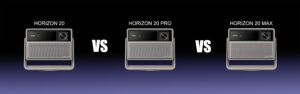
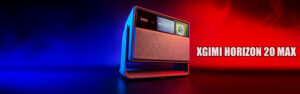
XGIMI Horizon 20 vs Horizon 20 Pro vs Horizon 20 Max Comparison
Published on: 13-03-2026 / Modified: 13-03-2026
I have finally completed my “collection” of XGIMI Horizon 20 projectors. I have now tested all three models in depth and can finally create a comparison to help you choose the right projector depending on your situation.
The XGIMI Horizon 20, XGIMI Horizon 20 Pro and XGIMI Horizon 20 Max projectors are almost identical in many respects. The main differences concern brightness and the optical block. I will therefore focus on these aspects because I have already tested all the other elements in detail in the individual articles that you can find below:
Detailed review of the XGIMI Horizon 20
Detailed review of the XGIMI Horizon 20 Pro
Detailed review of the XGIMI Horizon 20 Max
Each article also contains a price comparison to help you find the best deal.
If you are considering a purchase, please consider using my links:
UK: Official XGIMI.com website
USA: Official XGIMI.com website
EU: Official XGIMI.com website
World: Official XGIMI.com website
And to be complete, I also have a page where I list available discounts. They are not always available, but it never hurts to take a quick look before buying:
XGIMI promo codes
Which model should you choose?
If you are hesitating between the three Horizon 20 models, here is a quick summary:
XGIMI Horizon 20
: the best choice for use in a dark or slightly lit room.
XGIMI Horizon 20 Pro
: interesting if you want a bit more brightness without moving to the Max model.
XGIMI Horizon 20 Max
: the best choice for large images or brighter rooms.
The rest of this article will explain in detail why these differences exist and in which situations each model becomes the best choice.
Who is each model for?
XGIMI Horizon 20
- Ideal for use mainly in darkness
- A good choice for reasonable image sizes
- Suitable for the majority of users
XGIMI Horizon 20 Pro
- For those who want a bit more brightness
- Allows a slightly larger image
- More comfortable in a partially lit room
XGIMI Horizon 20 Max
- Suitable for large images
- Best choice for bright rooms
- Ideal with an ALR screen
Before getting into the comparison, I will first take a small detour with a few general explanations to help you understand the figures I will use. These explanations apply to all projectors.
Brightness or luminance?
When talking about projector brightness, two different concepts are often confused: brightness in lumens and luminance in cd/m² (candela per square meter). Yet these two values do not measure the same thing.
Lumens indicate the total amount of light that the projector can produce. It is a characteristic specific to the device. The higher the number of lumens, the more light the projector emits. Manufacturers generally use this value to compare the light output of projectors. Unfortunately these values are often inaccurate, or even exaggerated, and I will explain why.
Luminance, expressed in cd/m², measures the brightness actually perceived on the screen. It depends not only on the projector but also on other factors such as the screen size, its gain, or the projection distance. If the same amount of light is projected onto a larger screen, the light will be spread over a larger surface and the image will therefore appear less bright.
This can be compared to a watering can:
Lumens correspond to the amount of water coming out of the watering can, while luminance corresponds to the amount of water reaching each square centimeter of the ground. If you water a small area, the water will be concentrated. If you water a large surface, the same quantity of water will simply be spread out.
It is exactly the same with light: the starting quantity (lumens) is fixed and limited, but it must be distributed over the entire projection surface.
This is, among other things, why the announced lumen figure almost never reflects reality. The size and type of screen play a very important role. What matters for you is therefore luminance rather than lumens, because luminance corresponds to the light you will actually perceive.
So keep this in mind: lumens remain very theoretical, luminance is much more representative of reality.
Brightness and distance
The size of the image produced by a projector depends directly on distance. The further you move the projector away, the larger the image becomes. And the larger the image is, the darker it will appear.
Choosing a projector therefore requires knowing the throw ratio in order to calculate the screen size relative to the distance. This is an absolutely critical criterion.
All XGIMI Horizon 20 models use the same throw ratios:
1.2 for the minimum zoom
1.5 for the maximum zoom
How do you calculate the image size?
With a throw ratio of 1.2 you obtain an image width of 83 cm for each meter of distance between the projector and the projection surface.
With a throw ratio of 1.5 you obtain an image width of 66 cm for each meter of distance between the projector and the projection surface.
Your screen size will therefore determine the distance at which you need to place your projector. Ideally the projector should be perfectly aligned to avoid corrections. Any deviation in the angle will modify the orientation of the image and also the brightness.
What distance is needed to obtain the right image size?
The distance between the projector and the screen directly determines the image size. The Horizon 20 range projectors have a throw ratio between 1.2 and 1.5.
Here are a few concrete examples:
100-inch image
With a throw ratio of 1.2, you need about 2.65 m of distance.
With a throw ratio of 1.5, you need about 3.30 m.
120-inch image
With a throw ratio of 1.2, you need about 3.20 m.
With a throw ratio of 1.5, you need about 4 m.
150-inch image
With a throw ratio of 1.2, you need about 4 m.
With a throw ratio of 1.5, you need about 5 m.
These values remain indicative. Actual brightness will also depend on the model chosen and the lighting environment. To obtain a more precise estimate, you can use my calculator below.
The reality?
For this comparison, I chose to use useful values rather than maximum values.
What does that mean?
The XGIMI Horizon 20 projectors all have five or six different image configurations with sometimes a bit more brightness or sometimes a bit more contrast. In reality, only one configuration produces an image with correct color accuracy.
I will therefore base all my tests on this configuration (Film / D65) because if I guide you toward a brighter configuration, you will end up with an image with inaccurate colors.
I assume that if you want to invest more than €1000 in a projector, you want to obtain an image with correct colors.
I tested the three projectors using the same firmware version: 1.3.125.
Given the amount of work that this type of comparison requires, I am not sure I will redo all the measurements for future versions.
What does it actually mean?
If I throw numbers at you like 3000 lumens, it still doesn’t tell you what that means in real life. Is it sufficient? Is it useful?
That is what we are going to see.
There are recommendations regarding the amount of light emitted by the projection surface, and I will use these recommendations to guide you through the rest of the test.
To make things easier, I created a small tool where you only need to enter your projection distance and choose the projector. From there, the table will show in which situations you can use one of the Horizon 20 projectors.
This table is based on my real luminance measurements with an extrapolation for other distances. I cannot claim that the numbers are scientifically exact, but they should give you a good indication of what is possible in your home.
Explanation:
The first column indicates the laser level used by the projector. This level is one of the parameters you can adjust.
If the cell is green, it means the laser level provides enough light relative to the screen size and the chosen scenario (darkness, partially lit room, etc.).
Orange or red cells may also appear when the brightness is too strong. This can happen if you use the Horizon 20 Max at maximum brightness. Better to know that before burning your retinas.
Warning:
These values indicate whether the image will be “watchable”, but if you use a projector in daylight you will always lose contrast and the image will appear more washed out.
I will now show real examples to illustrate this table by always comparing the same image (with only a few seconds of delay at most) on a white screen and then on an ALR screen with a gain of 0.7.
For each screen and each projector I took one photo in total darkness and another in strong daylight. The image is not always perfectly sharp: this is not a projector issue, simply the fact that a frame capture does not guarantee a scene without motion.
Brightness comparison
Obviously the 20 Max is the brightest, followed by the 20 Pro and then the base version. This is not surprising, but it is interesting to compare how luminance increases with each laser power level.

On this graph, for example, you can see that the Horizon 20 is brighter than the 20 Pro at the first three laser levels. You can also see that the boost mode of the 20 and the 20 Pro significantly increases luminance, while this is not the case with the 20 Max.
If I compare laser level 10:
XGIMI Horizon 20 > XGIMI Horizon 20 Pro +22%
XGIMI Horizon 20 Pro > XGIMI Horizon 20 Max +29%
XGIMI Horizon 20 > XGIMI Horizon 20 Max +59%
These three projectors perform well in terms of brightness, but the Horizon 20 Max clearly outperforms the other two.
You might be tempted to consider only this model, but don’t rush. This projector is very bright and if you plan to use it only in a dark or partially lit room, it will probably be too bright and you will need to reduce the laser level.
I therefore think the Horizon 20 should suit a very wide audience. Only if you want to use the projector in a bright room should you consider one of the other two models.
XGIMI Horizon 20
White screen / Daylight:
White screen / Total darkness
ALR screen / Daylight
ALR screen / Total darkness
Before moving on to the next one, here is my analysis for this first projector.
Using it in broad daylight with a white screen is not really suitable for watching movies. In darkness, however, it works very well.
You can compensate for the contrast loss with an ALR screen, but you will need to limit the image size to avoid it becoming too dark.
Based on my table, you can move the projector back up to 280 cm with the 1.2 throw ratio and 350 cm with the 1.5 throw ratio.
If you choose an ALR screen, these values will be lower. The table will provide the appropriate distances.
XGIMI Horizon 20 Pro
White screen / Daylight:
White screen / Total darkness
ALR screen / Daylight
ALR screen / Total darkness
With 22% more light you can obviously consider a larger image. However, the conclusion for daylight use remains the same: with a white screen it is not really practical.
With an ALR screen it becomes possible, but you still need to control the image size.
XGIMI Horizon 20 Max
White screen / Daylight:
White screen / Total darkness
ALR screen / Daylight
ALR screen / Total darkness
This projector checks almost every box, but I would not go as far as recommending it on a white screen in daylight because that would be somewhat wasteful.
You can consider a larger image (while paying attention to projection distance) and pair it with a good ALR screen.
Sharpness
The optical blocks of the XGIMI Horizon 20 Pro and the 20 Max are identical and are supposed to produce a sharper and brighter image. I am showing the same screenshot for the three projectors to give an idea of the differences.
XGIMI Horizon 20
Full image:
Zoom:
As you can see, sharpness is good, text edges are well defined, and I do not see any chromatic aberration.
I measured the brightness uniformity across the image and obtained an average degradation of 27% compared to the center. That may sound high but it is quite common and even a good result.
XGIMI Horizon 20 Pro
Full image:
Zoom:
The edge definition with the 20 Pro is slightly better. The transition between white and black is sharper, but you really need to look closely to notice the difference.
I measured an average brightness degradation of 21%. This is therefore better than the Horizon 20 but not necessarily obvious to the naked eye.
XGIMI Horizon 20 Max
Full image:
Zoom:
The result here is very similar to the Pro model and I measured a brightness degradation of 20.6%.
This test confirms that the 20 Pro and the 20 Max use a higher-quality optical block, but it should not overshadow the fact that the Horizon 20 also has a good optical block.
Common mistakes when choosing a projector
Relying only on the announced lumens
The numbers announced by manufacturers are often optimistic. Actual luminance also depends on image size and screen type.
Choosing a projector that is too bright
A very bright projector is not always an advantage. In a dark room, excessive brightness can become uncomfortable.
Ignoring projection distance
Image size depends directly on the distance between the projector and the screen. This is an essential element to verify before purchasing.
Conclusion
XGIMI has done a good job with these three projectors, and that is precisely what makes the choice more difficult, especially if you have never used a projector before.
With this article, I hope I have given you the keys to making the right choice depending on your situation.
In the end, the most important criteria remain the projection distance and the lighting conditions of your room. These two elements will very often determine which model is the most suitable.
The differences between the three models do exist, but they remain relatively limited. The most important thing is mainly to understand what these luminance values actually mean in your environment.
 LAURENT WILLEN
Head of myself on this blog
I share my passions on my blog in my free time since 2006, I prefer that to watching nonsense on TV or on social networks. I work alone, I am undoubtedly one of the last survivors of the world of blogs and personal sites.
My speciality? Digital in all its forms. I have spent the last 25 years working for multinationals where I managed digital teams and generated revenues of over €500 million per year. I have expertise in telecoms, media, aviation, travel and tourism.







Questions/Comments