




This comparison will gradually evolve as I progress with each individual review, but I will start with the elements that do not require testing. Some physical differences can already play a role in the purchasing decision, so I will begin with those.
A quick reminder: I am not paid to carry out these reviews. If this review has helped you make a decision, you can support me by purchasing products through my links.
Purchase from the official website:
XGIMI Elfin Flip 4K / xgimi.com
XGIMI Elfin Laser / xgimi.com
Hardware comparison
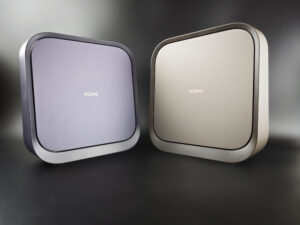
The two projectors are almost identical in terms of their external appearance. They have the same dimensions, and the main visual difference is their colour. The champagne-coloured version is the 4K model, while the other one is the standard laser model. The projector orientation is the same and most visible physical characteristics are identical as well, with a few exceptions that I will detail here.
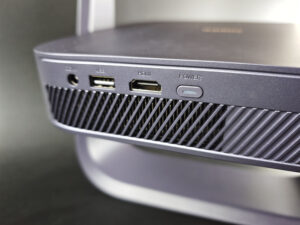
Let's start with the connections on the back, beginning with the laser version:
And then the 4K version:
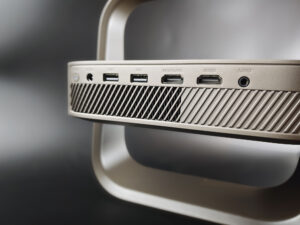
The laser version is less well equipped on the back: it only has one USB port and one HDMI port, whereas the 4K version has two of each. This is probably not the number-one purchasing criterion, but if you want to use several sources, the 4K version will be the only option.
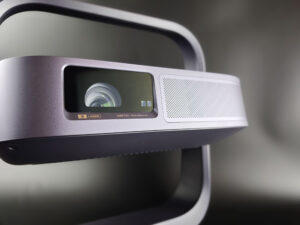
Let's now move on to the optical system, starting with the standard version:
And then the 4K version:
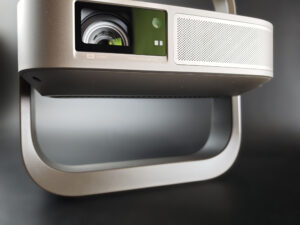
The difference here is probably a little more subtle. You need to look closely at the image to see that the 4K version is equipped with an optical zoom with a throw-ratio range of 0.98 to 1.3. This is important because an optical zoom provides greater placement flexibility without degrading image quality. These figures may not mean much to you, so I will illustrate what they represent in practical terms.
The figures 0.98–1.3 (4K version) and 1.2 (standard version) indicate the image size you will obtain depending on the projection distance. Below, I give the image width for each throw ratio based on a distance of 1 metre. This means that if you place the projector 2 metres away, you simply need to multiply the value by 2.
0.98 = 102 cm wide / metre of distance
1.2 = 83 cm wide
1.3 = 77 cm wide
The 4K version therefore offers greater placement flexibility than the standard version. If the depth of your room imposes constraints, the 4K model is better suited to this type of installation.
Another important difference lies in the DMD chip used. The DMD chip is an essential component in image generation. It consists of microscopic mirrors onto which the light from the triple-laser source is directed to form the image. The XGIMI Elfin Flip Laser uses a 0.23-inch DMD chip, whereas the 4K version uses a 0.39-inch DMD chip. The number indicates the size in inches. A 0.39-inch chip therefore measures slightly less than one centimetre diagonally. This is what it looks like:
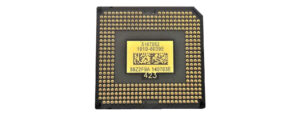
This means that the chip is extremely small, yet a component of this size can generate very large images. The size of the chip has an impact on image quality, although that impact will not necessarily be visible at every image size. It is mainly with larger images that chips such as the 0.39-inch or 0.23-inch DMD begin to show their limitations in terms of detail and sharpness. The 4K version provides a 69% increase in detail, but since there is no scientific rule defining the exact image size at which the 0.23-inch chip clearly reaches its limits, I will take photos of the same images on both projectors.
Summary
The hardware differences between the two projectors are very real; this is not simply marketing, and these first differences may already help you decide between the two models:- number of ports on the back
- optical zoom
- DMD chip size
Although these differences are already useful, I think what will interest you most is image quality. That is the next step: I will update this article as I make progress with each individual review. The headings below give you an indication of the types of tests I will be carrying out.
Brightness
On paper, both projectors have the same brightness level. In practice, however, I measured fairly noticeable differences.Actual measurements
| Mode | Elfin Flip 4K | Elfin Flip Laser | ||
|---|---|---|---|---|
| Level 1 | Level 10 | Level 1 | Level 10 | |
| Standard | 285 lm | 866 lm | 141 lm | 741 lm |
| Movie | 269 lm | 823 lm | 113 lm | 637 lm |
| Vivid | 359 lm | 1 061 lm | 138 lm | 741 lm |
| Game | 285 lm | 871 lm | 116 lm | 669 lm |
| Sports | 285 lm | 871 lm | 138 lm | 669 lm |
Impact on screen size
Based on my brightness measurements, here is the screen size you can realistically target for HDR:| Mode | Elfin Flip 4K | Elfin Flip Laser | ||
|---|---|---|---|---|
| Level 1 | Level 10 | Level 1 | Level 10 | |
| Standard | 60″ | 104″ | 42″ | 96″ |
| Movie | 58″ | 101″ | 37″ | 89″ |
| Vivid | 67″ | 115″ | 41″ | 96″ |
| Game | 60″ | 104″ | 38″ | 91″ |
| Sports | 60″ | 104″ | 41″ | 91″ |
Contrast
Contrast is directly related to brightness because it measures the difference between white and black.Native contrast
| Mode | Level | Elfin Flip 4K | Elfin Flip Laser | ||||
|---|---|---|---|---|---|---|---|
| White | Black | Contrast | White | Black | Contrast | ||
| cd/m² | cd/m² | :1 | cd/m² | cd/m² | :1 | ||
| Standard | 1 | 31.6 | 0.026 | 1 200:1 | 15.7 | 0.018 | 849:1 |
| 10 | 95.9 | 0.063 | 1 533:1 | 82.1 | 0.062 | 1 326:1 | |
| Movie | 1 | 29.8 | 0.026 | 1 159:1 | 12.5 | 0.014 | 900:1 |
| 10 | 91.3 | 0.064 | 1 418:1 | 70.6 | 0.061 | 1 153:1 | |
| Vivid | 1 | 39.8 | 0.032 | 1 259:1 | 15.3 | 0.012 | 1 257:1 |
| 10 | 117.6 | 0.063 | 1 861:1 | 82.1 | 0.062 | 1 333:1 | |
| Game | 1 | 31.6 | 0.026 | 1 227:1 | 12.9 | 0.016 | 804:1 |
| 10 | 96.5 | 0.063 | 1 542:1 | 74.1 | 0.062 | 1 190:1 | |
| Sports | 1 | 31.6 | 0.026 | 1 227:1 | 15.3 | 0.014 | 1 073:1 |
| 10 | 96.5 | 0.063 | 1 542:1 | 74.1 | 0.062 | 1 197:1 | |
The differences in white luminance are greater than those measured for black. With these black levels, both projectors perform well for portable models, but black is still perceived as dark grey.
Dynamic contrast
Although the standard model is advertised as having dynamic contrast, this option was not available on my unit, so the comparison ends there. The Elfin Flip 4K, on the other hand, has a DBLE (Dynamic Black Level Enhancement) option that allows it to achieve very high contrast (over 20.000:1), but at the cost of colour accuracy.Colour accuracy
SDR/REC709 measurementsLegend:
ΔE < 1: excellent
ΔE 1–3: good
ΔE 3–5: average
ΔE > 5: poor
| Mode | White | White ΔE | Red | Green | Blue | Yellow | Cyan | Magenta | Colour average | Most accurate | |||||||||
|---|---|---|---|---|---|---|---|---|---|---|---|---|---|---|---|---|---|---|---|
| Flip 4K | Flip Laser | Flip 4K | Flip Laser | Flip 4K | Flip Laser | Flip 4K | Flip Laser | Flip 4K | Flip Laser | Flip 4K | Flip Laser | Flip 4K | Flip Laser | Flip 4K | Flip Laser | Flip 4K | Flip Laser | ||
| Standard | 8309 K | 7320 K | 12.22 | 6.36 | 0.71 | 2.40 | 1.64 | 1.79 | 5.78 | 3.16 | 0.24 | 3.93 | 16.98 | 0.95 | 7.02 | 5.18 | 5.39 | 2.90 | Flip Laser |
| Movie | 6166 K | 5907 K | 9.45 | 5.46 | 1.65 | 3.34 | 2.62 | 3.57 | 2.10 | 0.62 | 3.62 | 3.39 | 1.68 | 5.60 | 3.01 | 0.62 | 2.45 | 2.86 | Flip 4K |
| Vivid | 9965 K | 8978 K | 17.23 | 13.99 | 12.83 | 4.19 | 11.95 | 1.38 | 3.37 | 2.09 | 9.39 | 8.37 | 21.54 | 4.81 | 11.43 | 5.17 | 11.75 | 4.33 | Flip Laser |
| Game | 8440 K | 8932 K | 11.94 | 13.72 | 2.96 | 4.24 | 2.84 | 1.80 | 5.88 | 4.45 | 1.02 | 8.07 | 16.47 | 5.73 | 7.11 | 6.74 | 6.05 | 5.17 | Flip Laser |
To further improve colour accuracy, you can adjust the gain in the 2-point white balance settings using the following values:
HDR/REC2020 measurements
In both cases, the HDR measurements show that the "Movie" mode also performs best, with comparable results on both projectors. To further improve colour accuracy, you can apply the settings provided below, provided that you are using a neutral white screen.
The behaviour is also similar in terms of nits. Both models can handle up to 1.500 nits without losing detail; above that level, detail starts to disappear.
Settings / calibration
XGIMI Elfin Flip 4K
SDR: R35 V51 B51
HDR: R39 V54 B55
XGIMI Elfin Flip Laser
SDR: R37, V54, B54
HDR: R32, V48, B75
Colour space
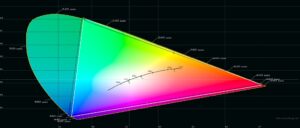
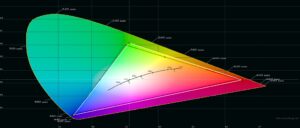
Both projectors cover REC709 without any difficulty, and REC2020 is also accessible on both models.
Sharpness
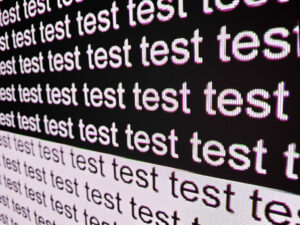
As mentioned earlier, this is where you will see a fairly significant difference between the two projectors.First, here is the sharpness of the Elfin Flip Laser:
And then the sharpness of the Elfin Flip 4K:
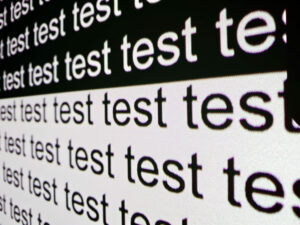
The result is quite clear: the Elfin Flip Laser (standard version) suffers from colour fringing, and the gaps between pixels are visible on a 100-inch screen. This is a hardware limitation, so you cannot completely eliminate the problem. You can reduce its impact by choosing a smaller screen size for the standard version.
Screen size
I usually use brightness as the main criterion when choosing screen size, but this time sharpness also needs to be taken into account. For the standard version, you can target a screen of around 80 inches; for the 4K version, you can go up to around 105 inches.If you want to determine the correct projection distance to obtain the desired brightness, I have a calculator here that will show you how far you can go with each projector, although this calculator does not take sharpness into account.
Laser speckle
I tested both projectors on several screens:NothingProjector 120 ALR - ultra-short throw
NothingProjector 100 white
NothingProjector 100 ALR - long throw
Vevor 130 white
I did not notice any sign of speckle on any of these screens.
Gaming
Both projectors are perfectly suitable for gaming, as they can reduce latency to below 30 ms. The 4K version goes even further by offering 120 Hz at 1080p as well as VRR.Conclusion
I have covered the essential points for comparing these two projectors, and I think the result is quite clear: the XGIMI Elfin Flip 4K outperforms the Elfin Flip Laser in many areas.The Elfin Flip 4K stands out in the following areas:
- optical zoom
- better DMD chip resulting in better sharpness
- 2 USB ports and 2 HDMI ports (instead of 1)
- low latency, 120 Hz and VRR for gaming
- brightness (and therefore screen size)
The 4K model is indeed slightly more expensive, but the price difference is fully justified. If your budget does not stretch that far, you should limit the Elfin Flip Laser to a screen size of around 80 inches to reduce the impact of its weaknesses.
Remember to check my promo-code page to get the best price before buying:
XGIMI promo code / coupon


A question? A remark? Feel like shouting? (not too loud)